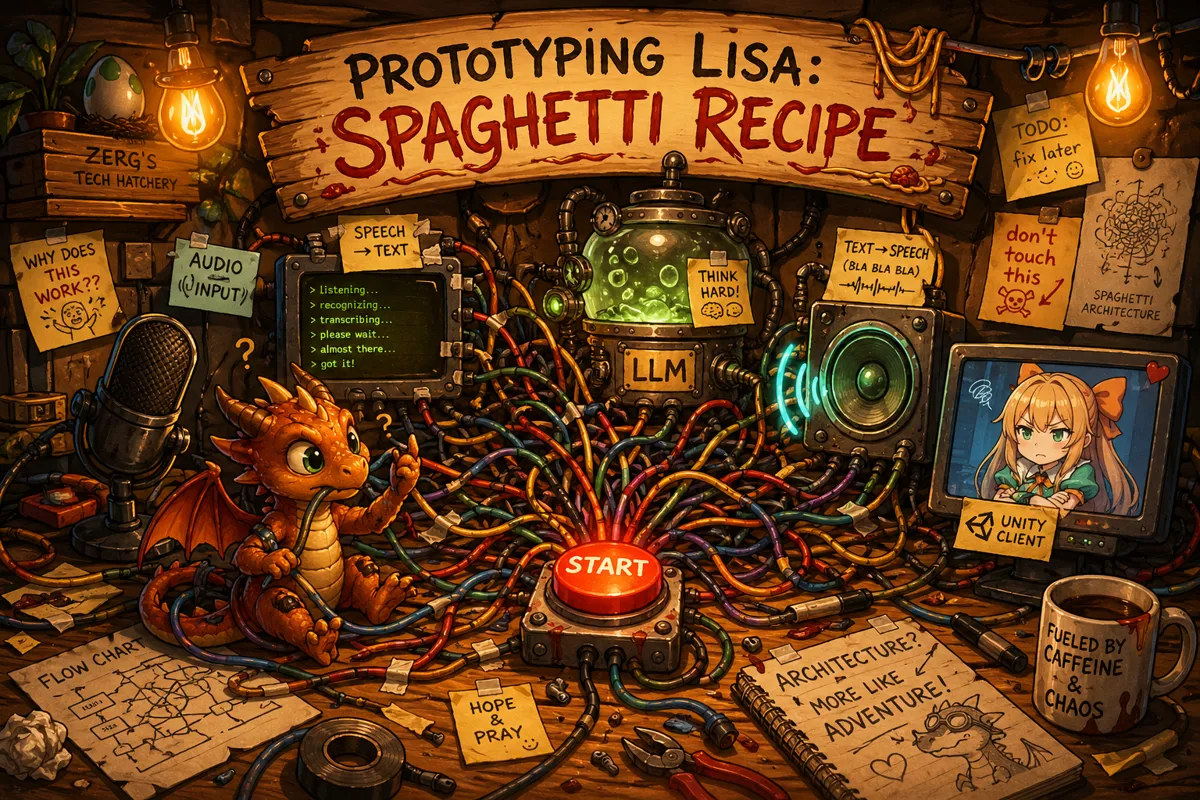
Prototyping LISA : Spaghetti recipe
Prototyping a new idea is a lot of fun (headaches). You think you know how something is supposed to work, give it a whirl and you're immediately hit with existential dread as everything falls apart; only to break your own facepalm-record five minutes later when you figure out you missed a property assignment.
In the previous article, we discussed the needs for project LISA, selected a 3D avatar and created the end of the entire process, a talking LISA. So now we get to... the beginning! Why work on the starting-part last? I guess we'll never know.
Prototyping ideas is messy, especially when I do it. My prototypes are often held together by glue, electrical tape and prayers to the machine gods. Before I show you the prototype mess, however, let's recap what we will be building in this part.
In general, we are building a WinUI 3 Control Panel-like application. The Control Panel hosts and accepts a method of communication with LISA, in this article we will limit that to the "Direct Chat" service, a sort of "wanna-be WhatsApp" inside the application you can use to talk to LISA. That means that I need to type my message, the system needs to take that message, check if it needs enrichment or additional context, send it off to a LLM service or provider, and then back to us to do with it as we please. Simple right? No? Oh... well, that is what we need to do...
In order to show you the spaghetti code, I made this flow chart for you to behold!
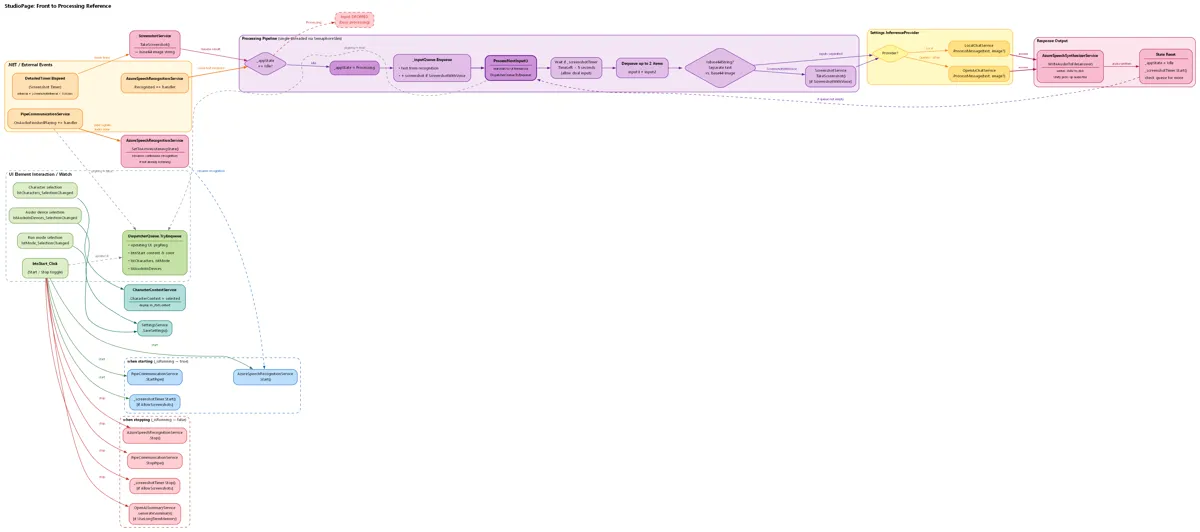
Here you see all the code that basically lives behind one button press. It has more lines and half-baked callbacks to other systems than even the oldest VB6 applications. This structure is a real biohazard as it waits on hardware input, online APIs and my own mental state, all of which can take a while to respond and nicely wrapped in tinfoil in the hopes something doesn't crash in the meantime.
You might be looking at this and think: "what am I looking at?" or "I am looking at it, it doesn't look that bad." If you don't get it, don't worry, that's normal around here (I'll explain what is happening later on); if you think it doesn't look that bad... let me now reveal that this entire spaghetti wiring is all connected to a single "Start" button that blindly fires a task into the ether and hopes someone or something picks it up. There is only the illusion of control, hopes and dreams of a clear structure, with proper handling and easy maintenance.
But it works! The initial prototype works. But using glue and paperclips isn't going to cut it for this. So let's plan our architecture properly!
The GREAT simplification
Simplification sometimes has a bad connotation... but not in this case; I am not simplifying it for you (well, partly...), I am doing this for me! Because I am the weirdo who is gonna have to build all this. It's generally easier to just look at a list and the occasional picture and work your way down. So let's start simple!
The simple...
Regardless of how we get the system to do what we want, let's look at what is always the same: the flow of our application:
We always put a message in.
The message might get enriched.
The message gets processed
The response comes out.
That means there are four key systems, one of which is optional. Message processing always flows into one direction, too, so there is no weird jumping back and forth between these systems.
The slightly less simple...
Let's take a look at what makes a "message" the thing that flows through our system and triggers a response. Right now, that message is the result of two smaller parts: me speaking into a microphone, and transcribing my speech into text. The transcribed text then gets molded into a "message" we use everywhere else.
Thing is, there is a good chance I want more ways to interact with this system; new ways of adding messages. Same idea goes for the enrichment process. I might want to add an image to a message or maybe a file or anything else that might be of use.
Then we catch a little break as we look at the "Message Processor". because this is the external system that will take our message to generate a response. Implementation of a Processor doesn't matter, and I decided that this is the only exception to the node rule. Although it would still be possible to pick a specific processor, it is not a flexible component like the "input" systems.
When our Processor comes back with a result, we need to do something with it. We're free to do with it whatever we want; we could write text to a chat app or generate speech for our Unity client to play; the possibilities are endless.
Now comes the point where I had to take a step back; an important question was going through my mind. How am I going to give shape to this idea? The core of the system doesn't care who or what sends a message, doesn't care who or what enriches it, doesn't care who processes it and doesn't care what we do afterwards. Before grabbing all my printing paper to draw out all kinds of ideas, I first wanted to explore what other systems are more or less like this and look at how they do it.
Enter stage left... the WASAPI
The `Windows Audio Session Asynchronous Programmable Interface`, shortened to `WASAPI`, is one of three default audio services that run out-of-the-box on Windows. WASAPI does a lot of things, but long story short:
It ensures audio flows where it needs to go
For the longest time, interacting with the WASAPI was reserved for C++ apps but with the introduction of "Universal Windows" all the way back in 2015, this changed.
Where C++ applications could import the 'audioclient' header file, C# had to make scary system calls in the hopes it got all the questions right and got a result back; wrong answer, no result (or a crash  ).There is quite a bit of development history regarding bridging the gap between C++ headers and the more contract-minded C# when it comes to Windows Runtime components and systems. Although I find it quite interesting, I won't go over it right now; it would make this article longer than it needs to be..
Microsoft decided that, in order to allow C# developers to interact with the audio system in a Universal Windows project, they would provide a new implementation, a graph-node-based implementation.
The general gist is: audio flows from one place to another, with modifiers in between. I could explain it with a million words, but let's just look at this image:
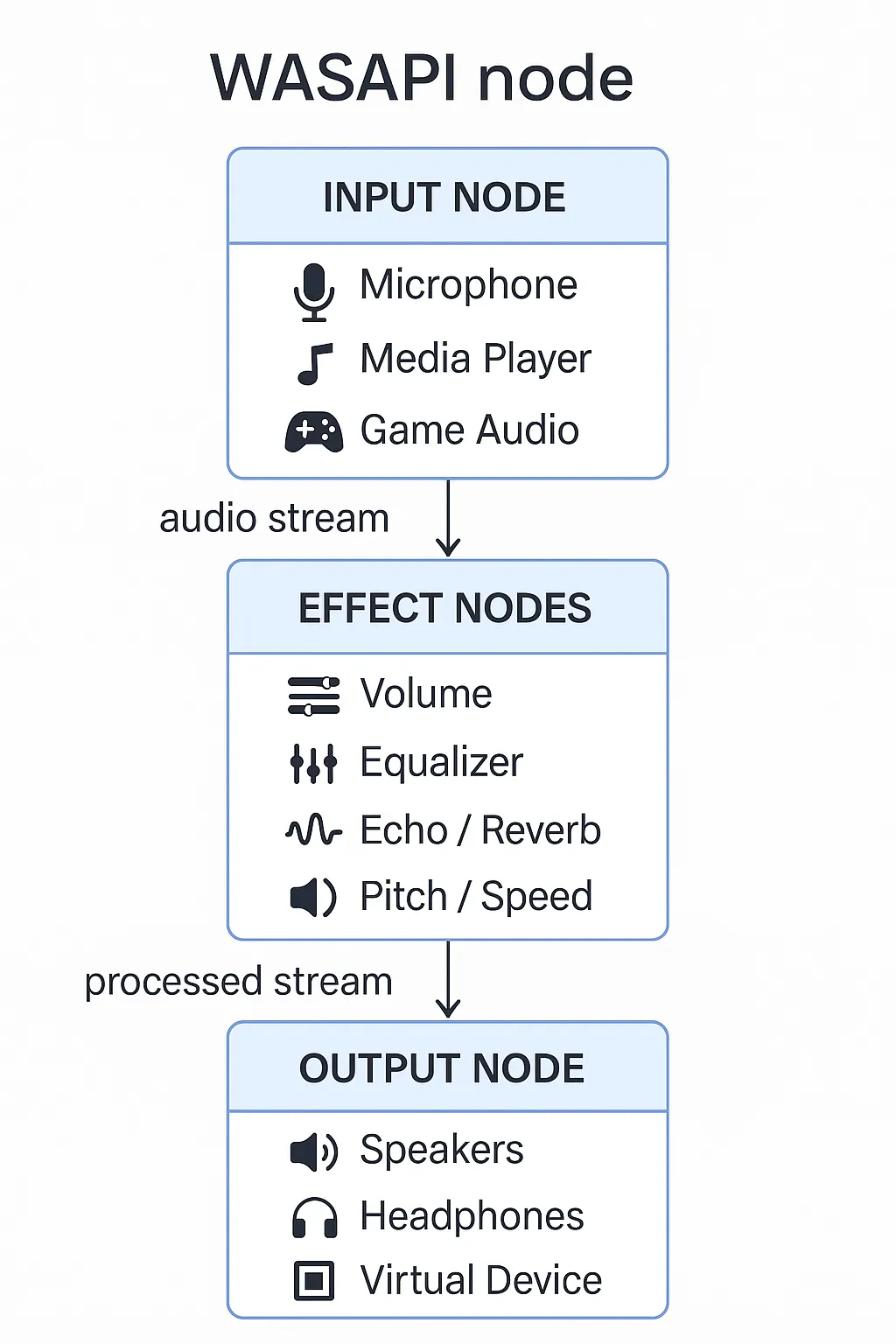
A C# developer would select an input node, string it to zero or more effect nodes and then send the result out through an output node. In a system like this, it doesn't matter what configuration you pick, the flow always works. It also means that if you misconfigure your nodes... well... that's on you...
All in all, this is the idea I want to follow for LISA: a node-based system that takes a message from whatever input node, modifies it, and sends it out. And even worse, it must be (relatively) easy to add new nodes.
Nodes... nodes everywhere
From the requirements in the chapter `The simple...`, we know we need at least 3 nodes:
an Input node
an enrichment node
an output node
I list 3 nodes here, even though I listed 4 phases earlier. I made the deliberate choice to not include the processor as a node. Nodes should be more or less interchangeable, the LLM service that does the thinking does not fit that idea in my opinion, it's like swapping your computer's CPU while you are actively using it.
So let's start scheming the structure of our nodes, starting with the input node:
    public interface IInputNode
    {
        /// <summary>
        /// Event that is triggered when a phrase is recognized.
        /// </summary>
        event EventHandler<string> MessageReceived;

        /// <summary>
        /// Start listening for input.
        /// </summary>
        void StartListening();

        /// <summary>
        /// Stop listening for input.
        /// </summary>
        void StopListening();
    }
I decided to start with a contract, an interface, to represent an input node. That means that who- or whatever has messages to feed into our system, are required to have a mechanism to start and stop and can raise an event when a message is ready to be send along. So let's implement an input node. We'll use the 'DirectChat' service as an input node, it simulates chatting through a text-chat medium as if you're chatting on WhatsApp (just with different colors...) We'll also use this service as an example for the output node later:
    public class DirectChat : IInputNode
    {
        public event EventHandler<string> MessageSent;

        public void ReceiveText(string text)
        {
            MessageReceived?.Invoke(this, text);
        }

        public void StartListening()
        {
            return;
        }

        public void StopListening()
        {
            return;
        }
    }
And the implementation on the Control Panel:
    public class ChatPageViewModel : INotifyPropertyChanged
    {
        public ObservableCollection<ChatMessage> Messages
        {
            get => _messages;
            set => _messages = value;
        }

        private ObservableCollection<ChatMessage> _messages;

        public ChatPageViewModel()
        {
            Messages = new ObservableCollection<ChatMessage>();
            SendMessageCommand = new RelayCommand<string>(SendMessage);

            _directChatService = App.ServiceProvider.GetRequiredService<DirectChat>();
            _directChatService.MessageSent += OnMessageSent;
        }

        private void SendMessage(string message)
        {
            Messages.Add(new ChatMessage(message, true));
            OnPropertyChanged(nameof(Messages));

            _directChatService.ReceiveText(message);

            MyMessage = string.Empty;
        }

    [...]
    }
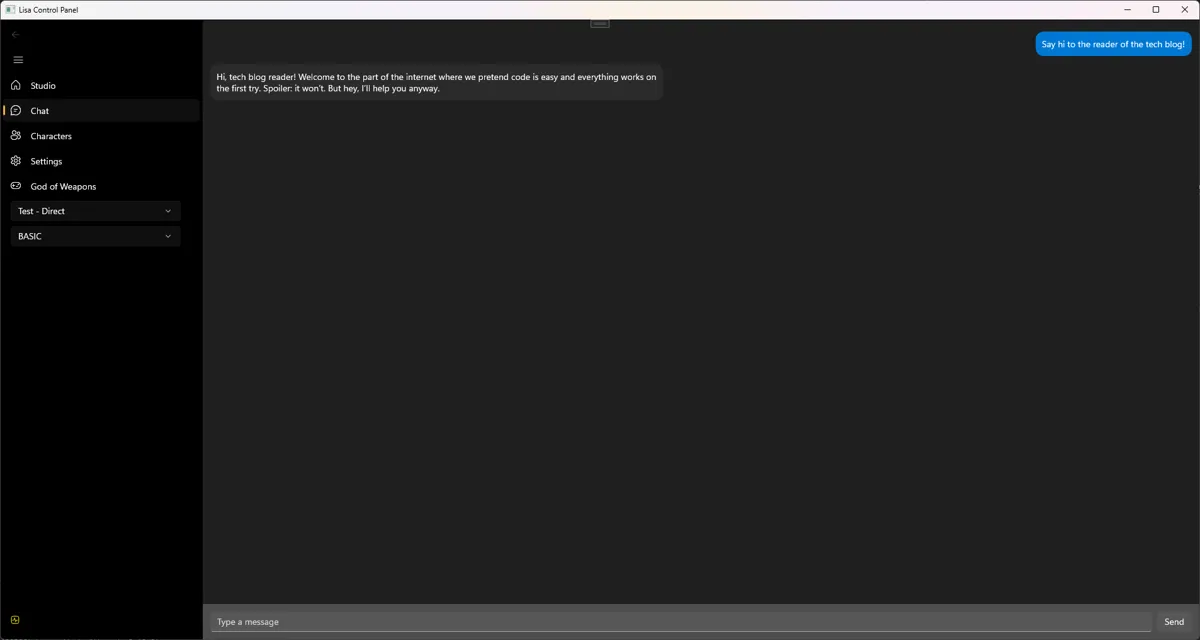
The Control Panel code is a little abbreviated, but to give a more complete picture, take a glance at how the screen that uses the above code looks:
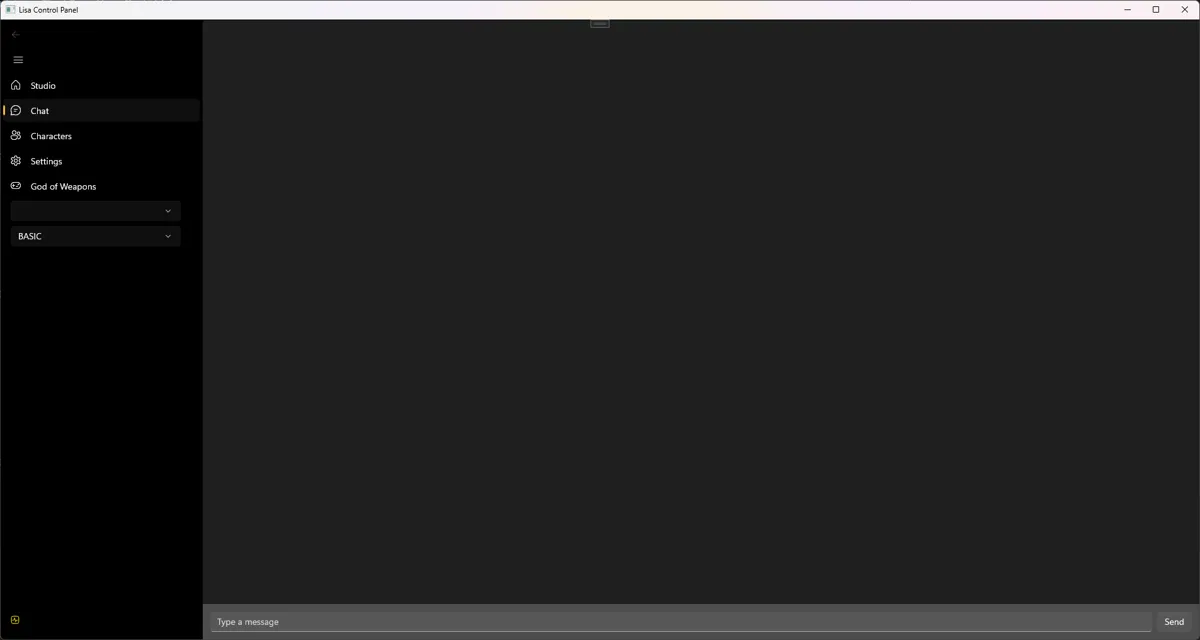
The user-interface is really simple. I type a message at the bottom, press send, and we're done.
I won't show off every node individually in every configuration, that would take too long and I'd burn through another keyboard. So for now I want to head to the next chapter.
The next chapter... the FLOW
So you get the idea of the nodes. But we also need a system to orchestrate the entire flow of messages. To accomplish this, we need two things:
A way to keep track of what nodes we want to use.
The actual system the data will flow through.
In order to keep track of what nodes are currently active, I designed a 'Profile'. A profile is an object that keeps several collections of certain node types. Sounds complicated? It's anything but...
    public class Profile
    {
        [Key]
        public Guid Id { get; set; } = Guid.NewGuid();

        public Guid? UserId { get; set; }
        public string Name { get; set; } = string.Empty;
        public Provider Provider { get; set; }
        public bool IsDefault { get; set; }
        public DateTime CreatedAt { get; set; } = DateTime.UtcNow;
        public DateTime UpdatedAt { get; set; } = DateTime.UtcNow;

        public List<IInputNode> InputNodes { get; set; }
        public IOutputNode OutputNode { get; set; }
        public List<IShutdownNode> ShutdownNodes { get; set; }
        public List<IEnrichmentNode> AdditionalServiceCalls { get; set; }

        public Profile()
        {
            InputNodes = new List<IInputNode>();
            AdditionalServiceCalls = new List<IEnrichmentNode>();
            ShutdownNodes = new List<IShutdownNode>();
        }
    }
This is it, a thing with lists. Each list keeps track of its own nodes. So our "DirectChat" node would be stored in the "InputNodes" list.
So now let's take a look at the flow! This time, instead of code, I will show you a graph; for the simple reason that it would simply make the page too long otherwise!

The last thing I want to cover today is the "output node", it's not all that dissimilar from an input node but it flows the other way instead (as you might have guessed). An output node is the final destination of a generated response. It could be anything; like speech synthesis to create a voice, or a text message send somewhere. Let's take a look at the general shape of an output node.
    public interface IOutputNode
    {
        /// <summary>
        /// Event raised when the Queue system has finished processing the message and can be finished up by the output node.
        /// </summary>
        /// <param name="message"></param>
        /// <returns></returns>
        Task ProcessOutputAsync(string message);
    }
Well... that doesn't tell us much... We only have a contract saying "whatever identifies as an output node, MUST implement this one method!" So let's take a look at our previously mentioned DirectChat service.
You might notice that we are using the same DirectChat service as before, just with the added IOutputNode interface.
    public class DirectChat : IInputNode, IOutputNode
    {
        public event EventHandler<string> MessageReceived;
        public event EventHandler<string> MessageSent;

        public async Task ProcessOutputAsync(string message)
        {
            MessageSent?.Invoke(this, message);
            await Task.CompletedTask;
        }

        public void ReceiveText(string text)
        {
            MessageReceived?.Invoke(this, text);
        }

        public void StartListening()
        {
            return;
        }

        public void StopListening()
        {
            return;
        }
    }
What does this do? It sends the response generated by the LLM to whatever happens to be listening to the "MessageSent"-event handler. That's some crappy naming on my part...
But it does make it trivial to implement a "back-and-forth" messaging system on the Control Panel:
    public class ChatPageViewModel : INotifyPropertyChanged
    {
        public ObservableCollection<ChatMessage> Messages
        {
            get => _messages;
            set => _messages = value;
        }

        private ObservableCollection<ChatMessage> _messages;

        public ChatPageViewModel()
        {
            Messages = new ObservableCollection<ChatMessage>();
            SendMessageCommand = new RelayCommand<string>(SendMessage);

            _directChatService = App.ServiceProvider.GetRequiredService<DirectChat>();
            _directChatService.MessageSent += OnMessageSent;
        }

        private void SendMessage(string message)
        {
            Messages.Add(new ChatMessage(message, true));
            OnPropertyChanged(nameof(Messages));

            _directChatService.ReceiveText(message);

            MyMessage = string.Empty;
        }

        private void OnMessageSent(object sender, string reply)
        {
            var style = (ResponseVoiceStyle)reply;
            Messages.Add(new ChatMessage(style.text, false));

            OnPropertyChanged(nameof(Messages));
        }

    [...]
    }
And with some wiring, you end up with something that looks like this:
Click to zoom in!
The cliff hanger ending bit
Of course there is a lot to say about the node structure, and we haven't even covered the more interesting nodes! Those will come next time! But creating this set-up also opens door to more interesting experiments, like trying to teach LISA how to play certain video games. Regardless of the future, I will quickly list what is currently in the box:
Input nodes
VOSK (speech Recognition service)
Azure Speech Recognition service
Twitch Websockets (receiving chat messages and events during live streams)
Discord text messages (only on servers)
Enrichment nodes
Screenshot service (equivalent to "Print Screen" on your keyboard)
DirectShow screengrab (often used in virtual cameras and scene used in video calls)
Output nodes
DirectChat
Azure Speech synthesizer
Discord
Shutdown nodes
Long-term memory service (create a memory of what happened today and use that memory in new sessions).
There is a lot going on with LISA, she's not just a single process, she's growing to become an entire ecosystem!
So ends another article, and it was a long one! I have pleaded with LISA to give you a cookie... but she took it for herself... sorry about that. But thanks so much for sticking around! If you want to show your support, how about you leave a reaction down below and sign up for the weekly newsletter? Newsletter is delivered every Friday to your inbox, so you can keep up to date with what I am doing, what I broke and what annoyed LISA the past week! See you next time!
Keep on keeping on!
 What did you think?

