Introduction to LISA! Your own digital AI friend!
Sometimes, I get these brain-farts; spectacular ideas that come with a fully fleshed-out blueprint. It's kinda like Archimedes yelling 'EUREKA' in a bathtub. But unlike our Greek friend, I am sitting in my chair, scouring the internet for funny cat videos or something like that.
Then I saw it: a personality created using AI and given a form using a 2D avatar. It reacted to messages and things on the screen. Safe to say, I was immediately intrigued.
So I sat down (I was already sitting, but who cares), put on some heavy metal and went into deep contemplation. How could I build my own buddy? What would it even look like? How would I interact with it?
The rough edges
First, what would I use for my experiment?
Everyone is already using Python, so that's boring. bleh. .NET is much more my style.
In what form? A web-app?
Probably not. A web-app means renting server space (or a app service on Azure). And the idea of building a web-app that only I can use and have to host through localhost feels... unnecessary.
Maybe something native?
Windows, that means WinForms, WPF, UWP and WinUI. Plenty of choice, all with strengths and weaknesses. It's been a while since I worked on a native application. Let's go with that!
What about the brain?
Ah, the thing that goes "brrrr" when you put something into it in the hopes you get something out. Plenty of brains out there, but which one to chose?
OpenAI?
Aggressive marketing, I think that is well to their advantage. Well rounded models (or at least good enough for what I'm doing). Works with text and images, solid first choice. Also comes with a NuGet package!
But why just one?
Azure has a whole host of models available, on top of that, I can host private endpoints for any model I want! Or I can host something locally using LM Studio.
Brain selected... now what should it look like?
At first, I thought this would be the biggest hurdle. Whether I go for a 2D or a 3D model, I am no artist, heck, I can barely draw a stick figure! But let's start from scratch.
How am I going to "host" the visual character?
Plenty of choices, good and bad ones. Could make something myself: a 3D viewport with a little bit of DirectX magic... that's way too overkill. Maybe a game engine. Unreal? It is capably of plenty of things, but I have my reservations about it. Unity? I have worked with it in the past. Sure, why not.
What is my character going to look like?
I tried putting some thoughts down, but nothing really clicked for me. Maybe a placeholder asset would suffice, at least until I get something going. So, to the internet I go and not long later, I found this:
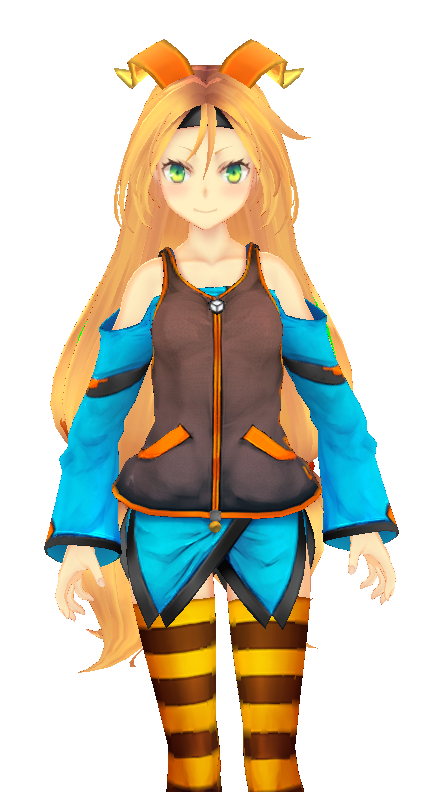
Let me introduce you all to this lady. This is "Unity-chan", the current placeholder... and as we all know... there is nothing as permanent as a temporary solution.
So thanks, Unity Japan, for this amazing contribution!
When I saw this character, I was sold. It also came with some extra technical features I needed, but we will discuss those in another post.
We have a brain and a look... now what should she sound like?
I wanted something more than just text messaging, I wanted an experience. I talk, she talks. But how would I even get her to do that? And what would she sound like?
How do I get her to talk?
Speech-to-Text is nothing new; it's been around for quite some time, Windows even has an accessibility feature for it all the way back in Windows Vista - but that is not usable in my case. Our lady needs to be expressive in her voice; that is a hard requirement.
ElevenLabs claimed it had the solution! But I couldn't get my desired result. Then I came to Azure Speech Studio and, more interestingly, to SSML: Speech Synthesis Markup Language. We'll eventually do a deep-dive into SSML, but in short: it allows us to specify how text is spoken, with what emotional tone, pauses, pronunciations and much more.
So let's summarize what we have.
.NET WinUI 3 application.
OpenAI SDK
Azure Speech Synthesis
That should be enough to get me going for a while, wiring everything up and meticulously testing every step of the way. Next time, we'll go into personality, interaction channels and the actual prototype!
WinUI 3 + OpenAI SDK + Azure Speech Synthesis — ambitious combo. Betting a coffee your ‘meticulous testing’ will devolve into frantic debugging and five tabs open titled ‘why won’t it build’.
 What did you think?


Love the ‘everyone’s using Python’ flex — but if you want a Windows-native AI buddy, spare us WinForms-era UI and go WinUI 3, MAUI or Avalonia so it actually looks modern. Psst: Blazor Hybrid lets you keep web dev vibes without renting Azure, so you can blast heavy metal while the bot does the thinking.