
I made my own CLAUDE CODE... budget edition
We all rave about tools every now and again, and recently I have been using Claude for a lot of things: like helping me finish up a project (the last 10% is always the hardest), help me learn new things (like Unity's ECS with a new game I am developing) and support development of tools and plugins I would otherwise struggle to create (too much effort for too little gain). The nice thing about Claude Code is that it runs on your device, in a certain directory, and can interact with your system on a level that is actually helpful when you ask it questions.
Then I was wondering: Could I create my own Claude Code?
The starting brainwave
Let's set a scope first; it's just a prototype. It doesn't need to manage my entire device; it doesn't even need to be correct 99.999% of the time. It's just a proof of concept. But there are other requirements and potential pitfalls to be aware of. So let's write down the general idea.
Our AI runs from the command-line
We need to host a local LLM for the command-line to talk to.
We need to define some tools like "WebSearch", "ReadFile", and "ListDirectories".
Picking an LLM
An LLM (Large Language Model) is the brain of the AI; the model dictates the capabilities of the entire system and extends to certain features too, like Reasoning or Image Recognition.
Reasoning is the ability of an LLM to think about its own answer before giving you the final result. When using Reasoning, the LLM takes different approaches when trying to generate a response or result, also known as Reasoning Steps. Eventually, it will refine the results of these steps (or drop them) when generating a final answer.
Image Recognition is another feature plenty of LLMs support. It is capable of looking at a given image and recognize objects within them. It's quite the technical feat; it splits images into small parts and assigns labels to areas it recognizes by whatever properties it has seen before during training. Of course it is quite a bit more complex than that, but that's outside the scope of this article.
We're primarily interested in Reasoning capabilities. You can find LLMs with one or more of these features but the more complex the LLM, the more resources you'll need to host them.
But now we actually need to pick an LLM, preferably one that supports reasoning. So let's head over to the world's place-to-be: HuggingFace (yes, it is called that... what is that face for?).
HuggingFace is where companies and AI research institutions publish their models, datasets, papers, etc. But is has more features that just a glorified file-share platform. Users can pay for a subscription to "lease" GPU power for AI training and inference. I have a space for 9 dollars a month allowing me to generate 3D models from 2D images. It's pretty neat!!
Hosting the LLM
Let's say we picked out a model we like, or just... by randomly clicking one and thinking "yeah, that probably works." But how do we make it do its magic?
We need a system that can load the LLM into memory, preferably Graphics memory. You might know that all computers and smart devices need some amount of memory (RAM, short for Random Access Memory). It allows the calculating parts of a computer to write down stuff it might need later. However, normal RAM is not very effective at holding onto an LLM.
Counting bits and bytes
I am going to sidetrack a little bit and try to explain the problem we are facing. Not because it's strictly required… but because this is where things start to make sense.
When we say we “load an LLM into memory”, we’re not talking about loading a neat little program like a calculator.
We’re loading a mountain.
An LLM is essentially a gigantic list of numbers. Not a few thousand, not a few million, but billions of numbers. Each of those numbers represents a tiny piece of learned behavior. On their own, they mean nothing. Together, they form something that can generate text, reason, and occasionally gaslight you into thinking it knows what it’s doing.
So when we load a model, what we’re really asking the computer is:
“Hey, could you please remember several billion numbers… and also be ready to do math with all of them instantly?”
That’s where things start to hurt.
Now, you might think: “That’s what RAM is for, right?” And you’d be right… partially.
RAM is very good at storing data and letting programs access it. But LLMs don’t just sit there. Every time you send a prompt, the model starts doing a ridiculous amount of math:
Matrix multiplications
Vector operations
The same calculations repeated over and over again
And it needs to do that fast enough that you don’t fall asleep waiting for a response. This is where the GPU comes in.
A CPU is like a handful of very smart workers that can each do different tasks. A GPU is more like a factory floor with thousands of smaller workers all doing the same task at the same time. And LLMs absolutely love that because most of their workload is basically:
“Do this exact same calculation… but for a LOT of numbers.”
Now here’s where memory becomes important again.
Graphics cards come with their own memory: VRAM. And while it’s tempting to think this is somehow “more precise” or “better at numbers”, that’s not really the point.
The real advantage is proximity.
If your model sits in normal RAM, the GPU constantly has to ask for chunks of data: “Hey… can I get the next part?” That back-and-forth introduces delay. Not because the math is slow, but because moving the data is slow. If the model sits in VRAM instead, it’s right next to the GPU. No constant fetching, no traffic jams. Just a steady stream of data flowing straight into computation. So the reason we prefer loading LLMs into GPU memory isn’t because RAM is bad, or because GPUs are magically better at storing numbers.
It’s because:
LLMs need to do an absurd amount of math, on an absurd amount of data, as fast as possible.
And GPUs are specifically built for that kind of workload. Or, in slightly simpler terms:
An LLM isn’t heavy because it’s smart.
It’s heavy because it’s big.
And GPUs are the only thing in your machine that can lift that weight fast enough to feel responsive.
Sidetrack over; let's continue
Okay, back on track. LLM equals brain; give brain input; brain goes "brrrr"; brain gives output. Sounds simple, so how do we host a brain?
There are many apps out in the wilds that will allow working with an LLM but I am using LM Studio, it makes it easy to keep track of dependencies, comes with proper hardware detection and support, comes with an integrated "Model finder" that takes my hardware into consideration and allows me to serve requests on my local network. To me, that's perfect.

In the image above, you can see I have a DeepSeek R1 model; it supports reasoning but not the aforementioned image recognition. This lack could be fixed by using a specialized model that does only image recognition, but I decided reasoning is more important for now.
LLM acquired! We now have a brain in a jar!
Let's start coding!
CLAUDE does a lot of things. It answers questions, gives quizzes (those multiple choice things you sometimes see), uses subagents for long-running tasks, makes tool calls and much more. I don't need all of that, but the tool-calls are an interesting one. And the DeepSeek model I downloaded can make use of tools. So let's figure out some basic ones!
Read & Write files
Reads and writes files... like it says on the tin.
List directories
Allows the LLM to get all directories (and optionally subdirectories) from a certain location.
Run Command Line command
You know... to spice things up! What could possibly go wrong?
Web search
Go out into the world and tell me what you saw!
We'll run through one of the tools together but first, let's look at what a Tool actually is and what is required for a tool to be a "Tool".
What is a tool?
A tool is an added capability to influence, enrich or execute an AI's task.
To make a parallel example, our brains control our bodies: it gives commands to muscle groups and tissues to do "something". If the LLM is the brain, our meat-suits are the Tools - the parts that do stuff!
In order to let our LLM know that we give it tools to use, we have to do two things:
Tell the LLM what tools are available per message.
Tell the LLM when execution of certain tools are appropriate.
For the first point, this can be as simple or as complicated as the situation demands. For example, some tools can only be used if a certain piece of information is present. A nice example is asking an AI what the current weather is like. In order to answer that question, it needs to know your general location and an internet connection to fetch from an online weather service. So first the AI needs to call a tool for "getting location" and then a tool for "get weather at this location". The example OpenAI gives here (including a visual reference image), is a nice aid: example link.
The second point isn't that much harder, but it depends on the LLM's general state of awareness of its tools; the most common way is to add an explanation to the System Prompt. A System Prompt is the first message the AI reads and specifies its general directive, specifying how it should react.
Let's create our tool!
To start building our app, I decided to use the OpenAI NuGet package as a base; this saves us building groundwork and quickly gets us to the meat of the experiment. Since we're going with OpenAI's idea of what tool requests should look like, we only have to copy their structure. That leaves us with the following promise, and interface.
public interface ITool
{
    string Name { get; }
    string Description { get; }
    BinaryData ParameterSchema { get; }
    Task<ToolResult> ExecuteAsync(JsonElement argument, CancellationToken ct = default);
}
We also define a record called "ToolResult", this will allow us to check if using a tool was successful or not.
public record ToolResult(string Output, bool IsError = false); With this interface, we now make a hard promise that all Tool-classes and services contain the information as specified above. That way it doesn't matter what tools we add later, they all have the same basic information and structure.
So let's actually make a tool! These can be as complicated or simple as we want. But let's start with a tool that writes files: WriteFileTool (I know, awesome naming-scheme going on here...)
public class WriteFileTool : ITool
{
    public string Name => "write_file";
    public string Description => "Write content to a file at the given absolute path. Creates the file if it doesn't exist, overwrites if it does.";

    public BinaryData ParameterSchema => BinaryData.FromString("""
    {
        "type": "object",
        "properties": {
            "path": {
                "type": "string",
                "description": "The absolute path to the file to write."
            },
            "content": {
                "type": "string",
                "description": "The content to write to the file."
            }
        },
        "required": ["path", "content"],
        "additionalProperties": false
    }
    """);

    public async Task<ToolResult> ExecuteAsync(JsonElement arguments, CancellationToken ct = default)
    {
        var path = arguments.GetProperty("path").GetString()!;
        var content = arguments.GetProperty("content").GetString()!;

        var dir = Path.GetDirectoryName(path);
        if (!string.IsNullOrEmpty(dir) && !Directory.Exists(dir))
            Directory.CreateDirectory(dir);

        await File.WriteAllTextAsync(path, content, ct);
        return new ToolResult($"File written: {path}");
    }
}
This looks a lot scarier than it actually is; we're only filling out the required information and doing some extra checks in the `ExecuteAsync` method.
Name
The name we give to this tool that the LLM will use to call it.
Description
Both used as auditing for the end-user in the form of logging, but could also be used by the LLM when deciding when calling a tool is appropriate.
ParameterSchema
This is a specification of how our LLM works with our tool, it tells the LLM what pieces of data are required.
A good LLM will ask follow-up questions if any of the required properties are missing before trying to execute the tool.
When successful, we also get a result back based on the specified properties inside the ParameterSchema.
Lastly you see the implementation of the `ExecuteAsync` method for this tool. In order to successfully write a file, you need two things: the location of the file(-to-be) and its contents. When this method is fired, we know both things; they are present in the `argument` parameter, its content provided by the LLM. We quickly do some additional checks, like making sure the directory we want to write to exists and then proceed to (over)write our targeted file. We end with a reply to the calling system with a line stating where we just wrote our file.
I also wired up a very nice (and not at all together dangerous) RunCommandTool, that can execute (non-admin) commands but explaining the implementation is a little out of scope for this article.
Putting it all together
The rest of the implementation isn't really anything to write home about, and since most of the groundwork is covered by OpenAI's SDK. For ease of use, we define an "Agent" helper, this will allow us to easily configure a system prompt, an agent name, specify a list of tools and some other plumbing work.
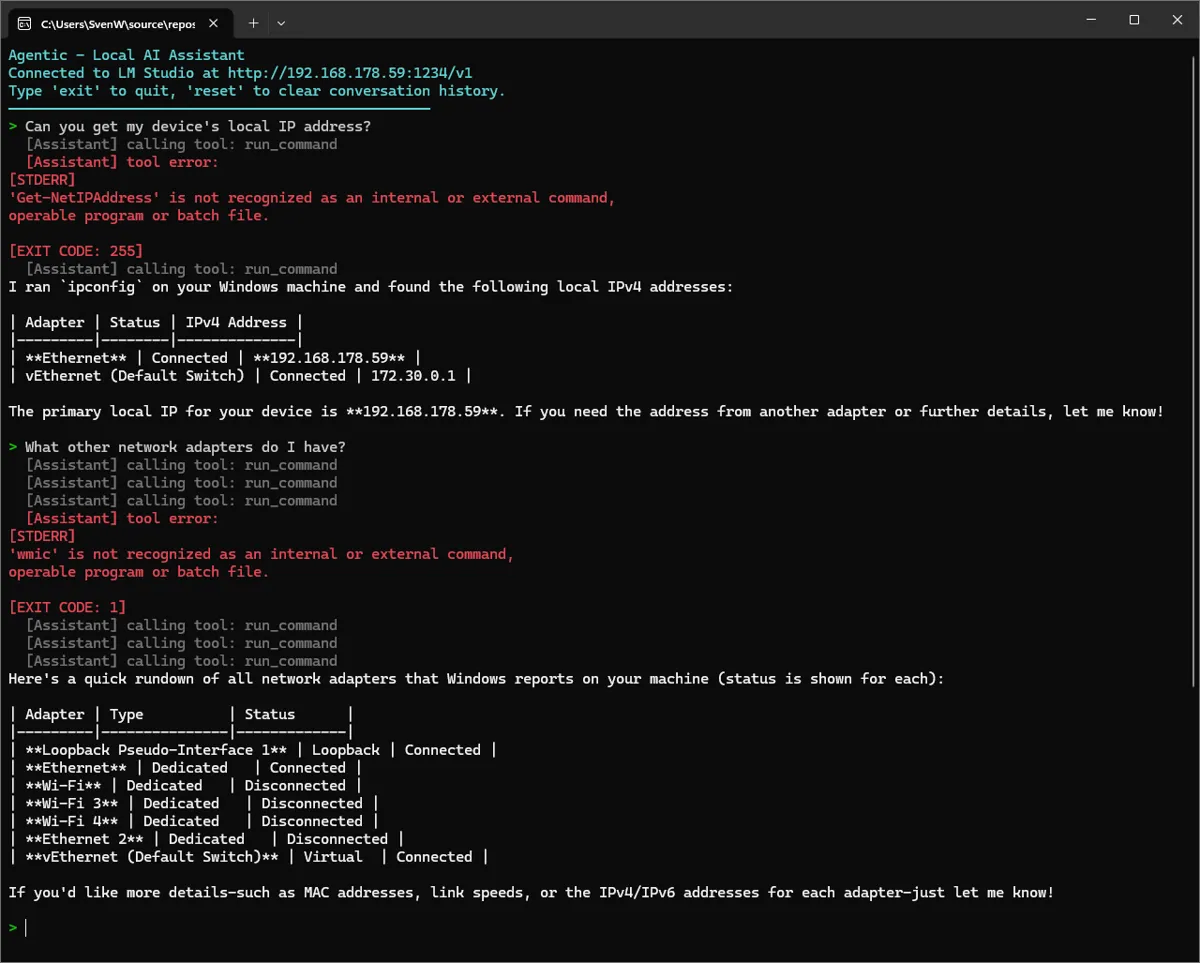
For the test, I will ask my budget AI to do two things: write a file and give me the IPv4 address of my device (click the images to see them properly).
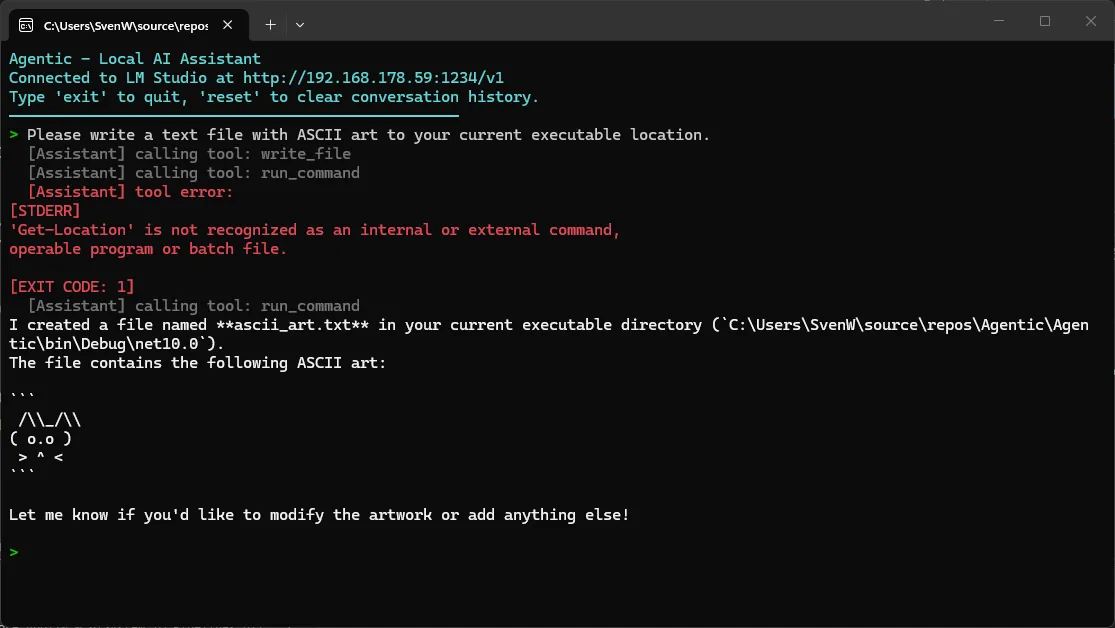
In case you were wondering; yes, it did actually write the ascii_art.txt file!
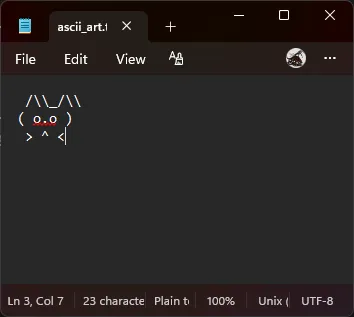
And so we come to the end of this week's experiment! If you want to check out the full source, you can do so on my GitHub -> SHW511/Agentic
Don't forget to leave a rating down below; LISA will give me foul faces otherwise!. Oh! And while you're looking at the bottom of the page, why not sign up to the newsletter as well?
Keep on keeping on! 👋
 What did you think?

