Engineering the Hatchery - Part 2 : Writing the hard way
When a normal person wants to write something like an article, they open up Word (or something similar), think about the subject they want to write on, write their article and publish it.
That means... I might not be a normal person.
Most publication platforms have a login system. You log into your account, work on your articles, press publish; all from one easy-to-access place. I decided I didn't want any of those quality of life features! Okay, that's not entirely true.
What do I need to write my articles?
When I was writing my articles about LISA's development on LinkedIn, I used the article editor. It had all the basic features like text decoration, adding media, headers; everything one could expect from a web text editor. But on longer articles with a lot of media (like images), things started to slow down. LinkedIn couldn't keep up with speed. It was slowing down so much I eventually deemed it unworkable. LinkedIn's article editor was not meant to house my comprehensive dev articles!
So I need something else. Something that:
Allows me to use text decorators (bold, italic, underline,
strikethroughandcode).Allows the usage of Headers.
Support both paragraphs AND simple line returns.
Enter = new paragraph | Shift + Enter = new line - same paragraph.
Try this in Word, it makes all the difference!
Allow the use of (rich) media like images, videos and stickers, and the ability to place them properly.
Support document formatting like lines, bullet lists and numbered lists.
That's quite the care package and everything a wanna-be article writer like me needs to get started with!
I could have chosen to opt for something that already exists, but I was feeling that particular itch to build something myself; something unique to me.
Introducing: The Hatchery's Article Writer
Shall I tell you something about me? When it comes to tools, I generally do not like it when they're web-based. Not because I don't like the internet, I love the internet! (well, up to a point.) No, no, the reason is much simpler, it's a sort of mindset, really. Web-based tools require a connection to the internet, and to me, that is a problem. Not because I have spotty internet, but simply because there is no good reason why an editor application requires a fully-established connection to a server, just for me to write text into a box. That doesn't mean I am against any kind of networked connection! There are plenty of reasons to have web apps and tools, I am just very conscious about these types of dependencies; I still want to be able to write even if I have no internet connection.
Since I only work with Windows, I decided to go with a Windows solution, So I started a new project using Windows' modern native application technology (stack) called WinUI 3.
So, what should it look like?
Looks are more than half the work these days. A good-looking app invites you to use it; so what should my writer app look like? After carefully thinking about it I wanted to explore the old Office theme a little. You know, the "sleek" and "modern" style introduced in 2007-ish. Big round home button in the top-right, the rounded corners everywhere, back when AI was this science-fiction fever dream. 😏
It was a nice idea... until I ran into (one of) my (several) one-and-only weakness(es): front-end.
Okay, that might be too generic a statement. My weakness lies in the creative process of designing a UI, and even then it depends on the platform. If you value your website or product, don't ask me to build you a front-end. If it comes to desktop and mobile apps, things get better.
So, let me show you some pictures on what I went with after lots of experimenting:
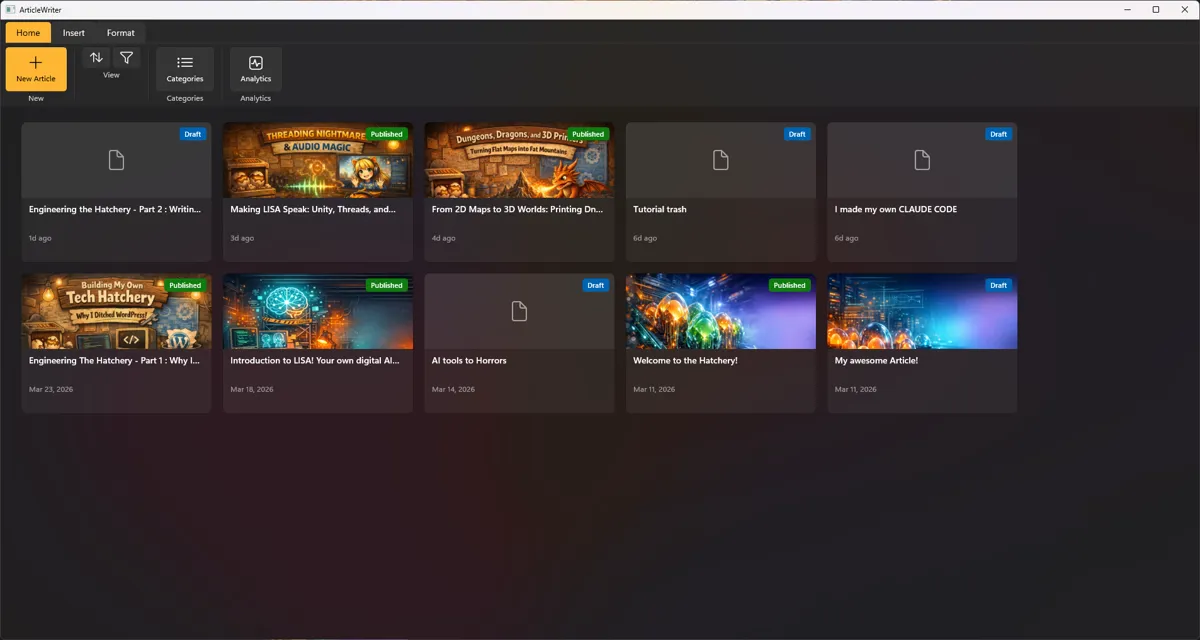
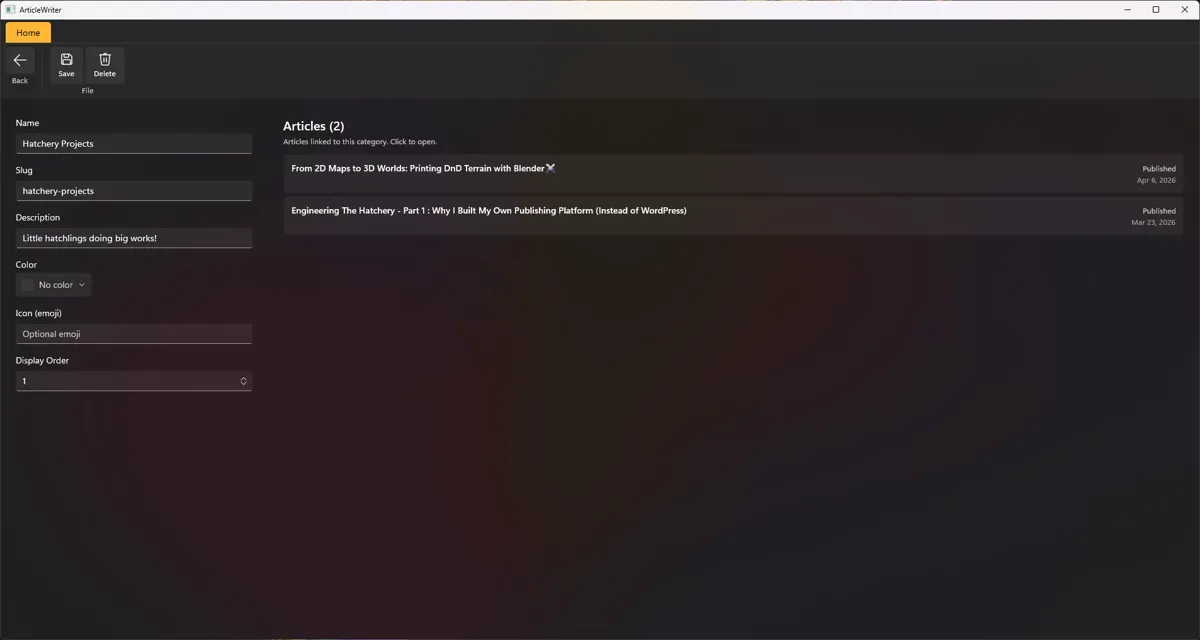
Starting the app, you get an immediate overview of all articles that are published or in draft. From here you can start new articles or update existing ones. You can also find the categories here, you see these at the top of the Hatchery website. Categories require a name and nothing more, but can be decorated with a nice color thingy and icon. There is also a quick list of what articles belong to a given category, neat!
The serious stuff
Then we come to writing the article and all that comes with it!
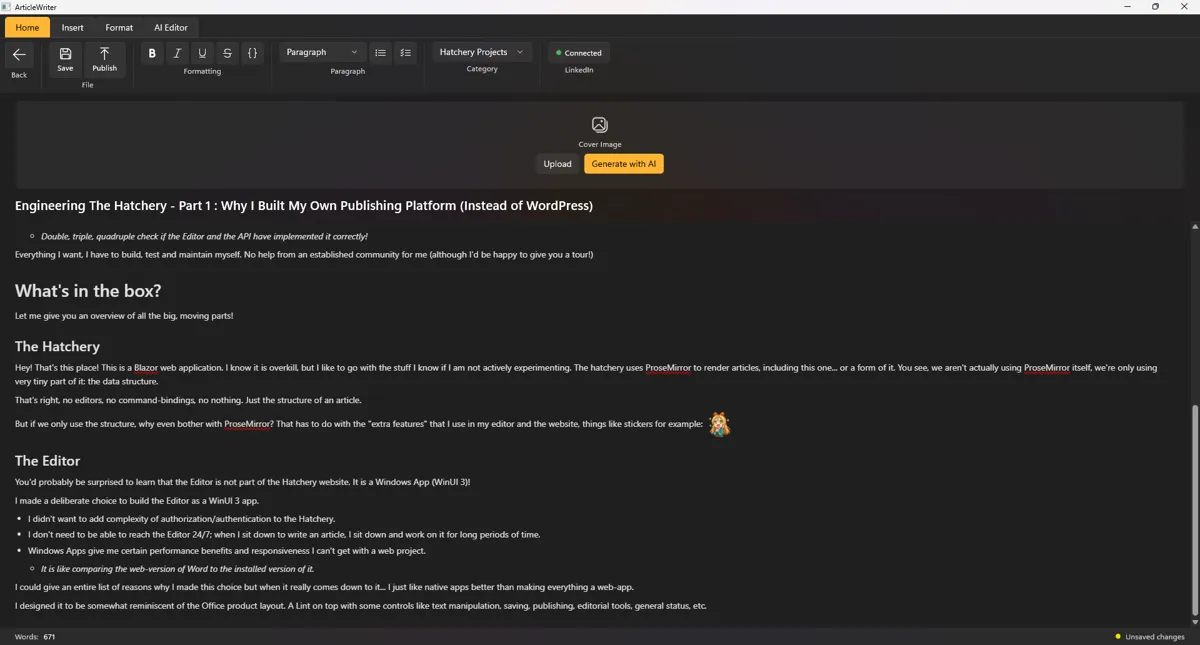
There are only two main areas here: the Ribbon at the top and the writing area that takes the rest of the page - with a cover preview squished between them.
The Ribbon contains most of the controls, think saving, publishing, formatting and paragraph magic; most of these you will recognize from other text editors! Next to those common controls, you can select what category this article will be part of and next to that is a space for publication channel statuses (aka, automagically posting stuff to other websites).

On the "Insert" tab, we find the "complex media" controls, where you can add photos and videos, stickers, manage the article cover image and allow LISA to give a piece of her mind.

The "Format" tab holds only a few extra features that are more specialized (but not necessarily more complex) formatting options; think links and quotes.
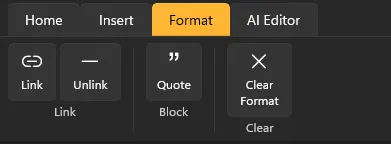
Then we come to the last tab: "AI Editor".
Although I write all articles myself, I am only human; I write the words as my brain speaks them (internally). That means my fingers always lag behind, causing me to sometimes miss a word or letter somewhere. These are mistakes that often don't show up on basic spell-checkers, or words that are grammatically correct, just not in the current sentence in a certain tense. And it may surprise you, but I don't have a ghost editor with me, so when I am reviewing my own articles, I tend to overlook mistakes. Something something log-in-your-own-eye something something. So in order to have at least something check my work, I wired up OpenAI to help out, checking both spelling and sentence flow.
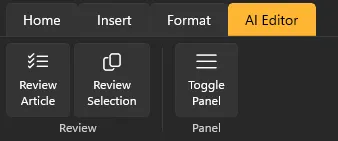
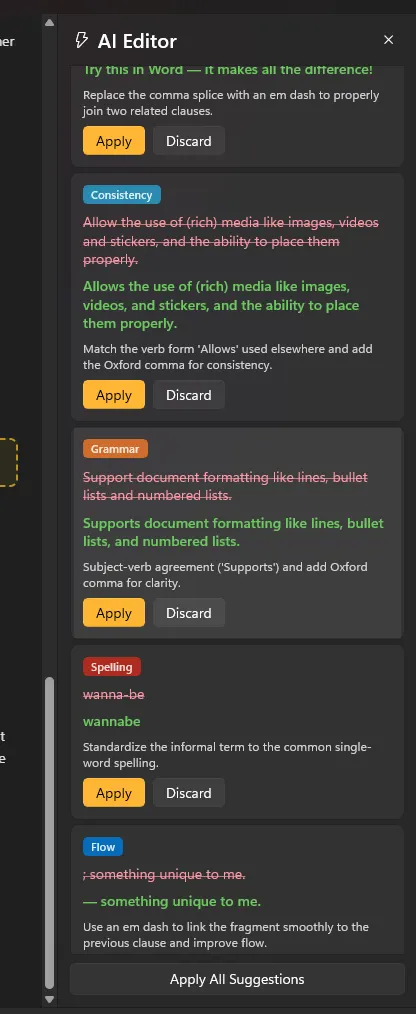
All that results in the articles you see on the Hatchery, and there isn't that much difference between what I see in the writing space and what you see on the Hatchery.
Keeping it safe - the easy way
The Hatchery website does not know anything; that's the beauty of the Hatchery. In order to do anything, it talks to a middle-man; an API. An API is really something that waits around listening until it receives a command. The Hatchery's API gets the articles, the categories, media, handles publishing and a lot more. The more technology-inclined reader may have noticed there is no specific login mechanism in the app, and technically, they would be correct... to a point.
The classic email-and-password combo isn't the only security measure that exists, even though in our web-dominated world, it might seem like it; in the end, we only need to prove that we are who we say we are. Using the email-password combo requires me to keep track of and properly secure "sensitive" information. And although securing passwords doesn't exactly require a degree in rocket science, I wanted to explore these options too. In my career I worked only with the "email 💖password" combo (plus the occasional 'Login with...' buttons). I just wanted to try something else. But let's ask ourselves: are users the only entities that can provide proof of identity?
I am going to spoil the answer (sorry), but it's no... and you probably already use it even though you might not recognize it. If you have a card to open the security gates or door at the office, you're technically using another form of "proof of you".
When I write articles, I often sit down at my desktop... at my desk. A device I am the sole owner and user of. So I decided it would make sense that, instead of me proving who I am, my device proves who we are using a certificate. You can see a certificate as a passport; it proves who you are against information held by governments and authorities.
In order to prove your identity using a certificate you need a couple of things:
An issuer
An entity that has verified your claim of who you are.
A subject
The person or device that requests a certificate from an issuer
Usage
How this certificate is used in a technical manner.
There are more properties like this, but these are just some basics. All these fields come together inside the certificate to then be used in a cryptographic operation to create a special sequence of numbers and letters known as a "thumbprint" sometimes also referred to as a "fingerprint", it is proof that things are as they are. This fingerprint is unique to me (as a user) and the device I am on. I could even go one step further and use specialized security hardware called a TPM2 chip, but that's a whole different can of worms. Technically, I don't need to check if my certificate came from a trusted source (DigiCert, GlobalSign, SSL.com, etc.) , so I keep it simpler, just checking properties I know are unique to me and mine.
The API demands proof I am who I am, and the Editor app provides it. Anyone else gets yeeted!
That was quite the journey. Lot's of pictures this time! I will put a final one of this article in the editor for completeness.
Did you know that both the Editor and the Hatchery get updated with new features very regularly? For example, you can now subscribe the newsletter so you never ever need to miss another post again! Leave a reaction down below and until next time!
 What did you think?


Automagically posting to other sites? Cute — hope you enjoy launching half-baked midnight drafts into the wild. Also, ‘allow LISA to give a piece of her mind’ is code for ‘pay attention, I roast free of charge’.