Engineering The Hatchery - Part 1 : Why I Built My Own Publishing Platform (Instead of WordPress)
As far as blogs and tech sites go, it is safe to say I went in an unconventional direction... because everything you see is handmade. There is no WordPress involved, no default theme copy-pasting, just me — with all the horrors and glory that come with it.
Now you might be wondering: "But why?"
Fear not, for your question shall not go unanswered. This is a series where I peel away the covers to reveal what's underneath! (Please don't step on the hatchlings ⚠️).
Why even DIY?
I wanted something personal to me, a space created where I can share the madness that goes through my mind and where I can share my ideas and projects! That means... introspection... I am a human of infinite curiosity; I can look at something and think, "How does that work?" Granted, I am not at a level where I take apart the microwave and put it back together, but maybe that is for the best.
So, if a space on the internet is going to be just for me, I might as well put some TLC into it, some "tears, sweat and blood" as some would say.
The gains
I can comfortably say that this is my stuff. Nothing about it is templated, nothing is plug-and-play. Doing things myself provides challenges to overcome and opportunities to grow. I can think about how I want to shape the experience, what do my readers see? How can they interact with my articles? How can I interact with my articles? I get to make the design and infrastructure decisions I would miss in a plug-and-play scenario.
The losses
If I break it... I have to fix it. No use in waiting for a patch or update. It's my work: my website, my server, my database, all of it. That means I bear responsibility for all of it.
Page loading too slow?
Get out the analytics; we're going hunting.
Want a new feature?
Double-, triple-, quadruple-check that the Editor and the API have implemented it correctly!
Everything I want, I have to build, test and maintain myself. No help from an established community for me (although I'd be happy to give you a tour!)
What's in the box?
Let me give you an overview of all the big, moving parts!
The Hatchery
Hey! That's this place! This is a Blazor web application. I know it is overkill, but I like to go with the stuff I know if I am not actively experimenting. The hatchery uses ProseMirror to render articles, including this one... or a form of it. You see, we aren't actually using ProseMirror itself; we're only using a very tiny part of it: the data structure.
That's right, no editors, no command-bindings, no nothing. Just the structure of an article. It's like buying a box full of shapes to only use the lid with the holes in it.
But if we only use the structure, why even bother with ProseMirror? That has to do with the "extra features" that I use in my editor and the website, things like stickers, for example: 
The Editor
You'd probably be surprised to learn that the Editor is not part of the Hatchery website. It is a Windows App (WinUI 3)!
I made a deliberate choice to build the Editor as a WinUI 3 app.
I didn't want to add the complexity of authorization/authentication to the Hatchery.
I don't need to be able to reach the Editor 24/7; when I sit down to write an article, I work on it for long periods of time.
Windows Apps give me certain performance benefits and responsiveness I can't get with a web project.
It's like comparing the web version of Word to the installed version.
I could give an entire list of reasons why I made this choice, but when it really comes down to it... I just like native apps better than making everything a web app.
I designed it to be somewhat reminiscent of the Office product layout. A ribbon on top with controls like text manipulation, saving, publishing, editorial tools, and general status. We'll take a deeper dive into the Editor and its features some other time. But just for your idea, here is what it looks like:
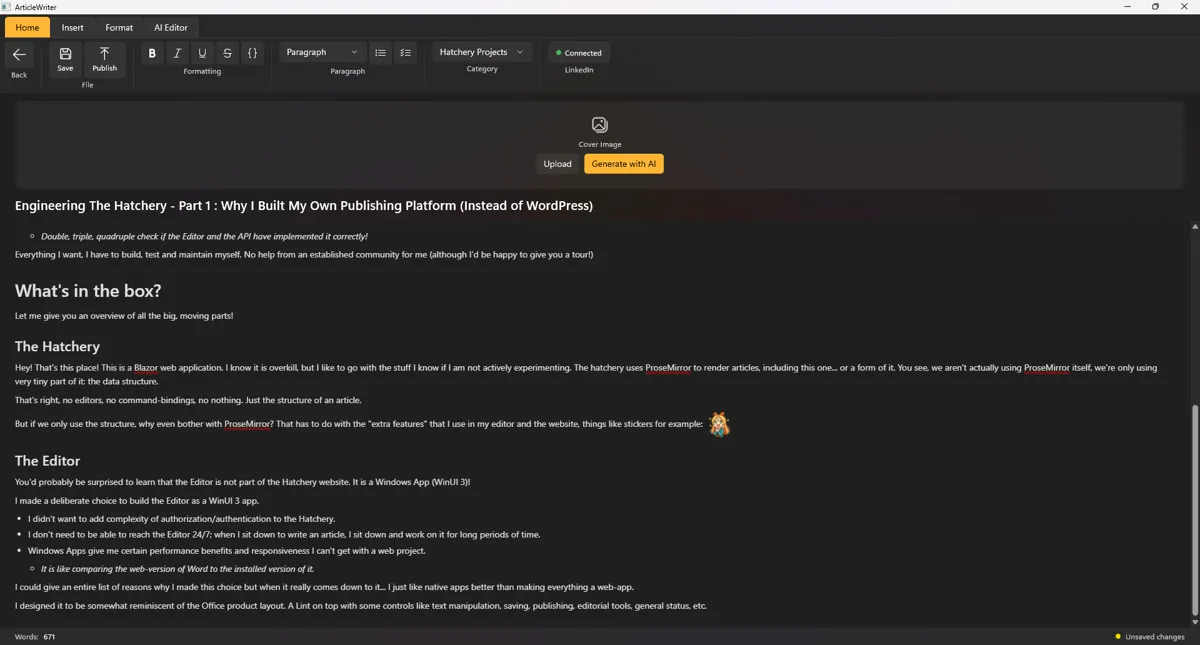
If you look close enough, you might see differences between this article and the screenshot when I was writing it!
The API
This is the piece of work that sits in between the Hatchery and the Editor. The way I set it up makes it an interesting beast. And I don't want to spoil it yet, but I have never seen anyone set up an API the way I did.
Safe to say, it communicates with the database to manage articles, reactions, and media.
So that is what's in the box and I am going to share it all with you! Be sure to stay tuned! And don't forget to leave a reaction down below (...even if they are not LISA flavored)!
 What did you think?

